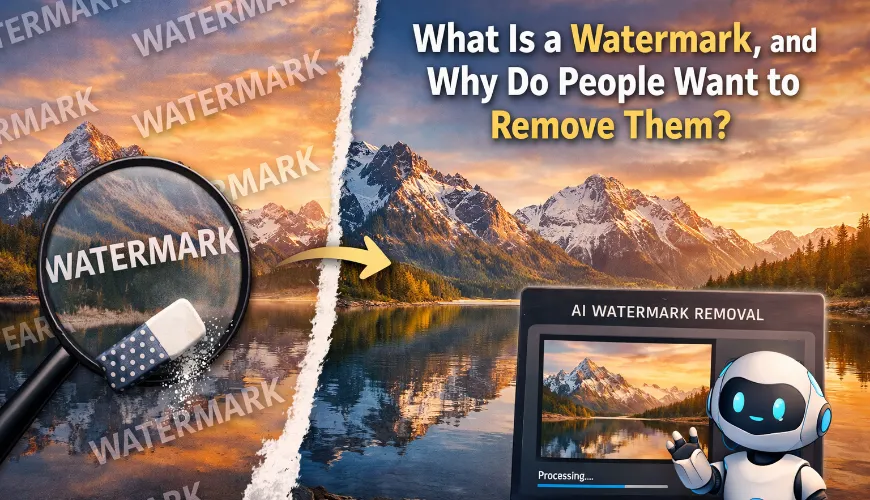

What Is a Watermark, and Why Do People Want to Remove Them?
You've probably seen them hundreds of times without giving them much thought. That semi-transparent logo sitting on top of a stunning landscape photo. The diagonal text repeating across a product image you found online. The photographer's name stamped right in the center of a portrait. These are all watermarks, and they serve a very specific purpose - but sometimes, they get in the way.
A watermark is a visible overlay placed on an image to indicate ownership, protect copyright, or signal that the image hasn't been purchased yet. Stock photo websites like Shutterstock and Getty Images use them extensively. Photographers use them on proofs they send to clients. Businesses place them on drafts before final approval. In all these cases, the watermark acts as a kind of digital stamp that says, "This belongs to someone."
But here's where things get interesting. There are plenty of perfectly legitimate reasons why someone might need to remove a watermark from a photo. Maybe you purchased an image and only received the watermarked version by mistake. Maybe you're working with your own old photos that you watermarked years ago and no longer have the originals. Or perhaps you bought a design template and the preview watermark is still embedded in one of the layers. Whatever the reason, the need is real - and until recently, the process was anything but simple.
The Old Way of Removing Watermarks
If you've ever tried to remove a watermark manually, you know the frustration. The traditional approach involves opening the image in software like Adobe Photoshop, using the clone stamp or healing brush tool, and painstakingly painting over every trace of the watermark pixel by pixel. It requires skill, patience, and a decent understanding of how image editing works.
For a simple watermark in a corner, this might take ten or fifteen minutes. But for a watermark that stretches across the entire image - especially one with varying transparency over complex backgrounds - you could easily spend an hour or more trying to get a clean result. And even then, the outcome often looks patchy. You can usually tell something was there.
Some people turn to free online tools, but many of these are hit-or-miss. They might work on basic cases but struggle with anything complex. Others require you to download software, create accounts, or sit through a maze of ads before you can even upload your file. The experience is rarely smooth.
This is exactly why AI-powered solutions have become so popular. They take what used to be a tedious manual process and turn it into something that happens in seconds.
How AI Changed the Game
Artificial intelligence has transformed image editing in ways that would have seemed like science fiction a decade ago. Modern AI models can analyze an image, identify which parts are the watermark and which parts are the original content underneath, and then intelligently reconstruct the hidden pixels. It's not just erasing - it's rebuilding what was covered up.
This technology relies on deep learning models trained on millions of images. The AI learns patterns: how textures continue beneath obstructions, how colors blend, how light falls across surfaces. When it encounters a watermark, it doesn't just smudge it out. It predicts what the image should look like without it and fills in the gap with remarkable accuracy.
According to a 2023 study published by researchers at Google, AI inpainting models have reached a level where reconstructed regions are nearly indistinguishable from the original content in many real-world scenarios (Google Research, 2023). This is the same underlying principle that powers modern watermark removal tools.
The result? What used to take an experienced Photoshop user thirty minutes now takes a few seconds with the right tool. And you don't need any technical skills to do it.
Introducing Claila's Watermark Remover
If you're looking for a fast, reliable way to handle this, Claila offers a dedicated Watermark Remover tool that uses AI to clean up images in moments. It's designed for everyday users - no design background required, no software to install, no complicated settings to fiddle with.
The process is straightforward. You upload your image, the AI analyzes it, detects the watermark, and produces a clean version. That's it. There's no need to manually select the watermark area or adjust brush sizes. The tool handles the heavy lifting.
What makes Claila's approach particularly useful is that it's part of a broader AI productivity platform. Alongside the dewatermark tool, Claila offers access to language models like ChatGPT, Claude, Mistral, and Grok, as well as AI image generators. So if you're already using the platform for writing, brainstorming, or creating visuals, the watermark removal feature fits naturally into your workflow.
Who Actually Needs This?
You might think watermark removal is a niche need, but it comes up more often than you'd expect. Let me walk through some common scenarios.
Photographers and content creators sometimes watermark their own work for social media but later need clean versions for a portfolio, a print order, or a client delivery. If the original unwatermarked file gets lost - which happens more than anyone likes to admit - a tool to remove the watermark from the photo becomes essential.
Small business owners frequently purchase stock images for websites, marketing materials, or social media posts. Sometimes the purchasing process glitches, or the wrong file gets downloaded, and you end up with a watermarked version even though you've already paid. Contacting support and waiting for a replacement can take days. A quick AI fix solves the problem in seconds.
Students and researchers often work with images for presentations or academic projects. They might have legitimate access to an image but only have a watermarked preview saved locally. Rather than hunting down the original source again, a fast cleanup tool saves valuable time.
Real estate agents, event planners, and marketers deal with high volumes of images daily. When watermarks appear on photos they've rightfully licensed or created, the ability to process them quickly matters. Time is money, and nobody wants to spend it fighting with Photoshop's clone stamp.
A Quick Look at How the Process Works
Using Claila's tool doesn't require a tutorial, but here's what you can generally expect when you use an AI-powered dewatermark solution:
- Navigate to the Watermark Remover page in Claila web application
- Upload the image that contains the watermark
- Mark what you want to remove and let the AI process and analyze the image
- Review the cleaned result
- Download your watermark-free image
The entire process typically takes just a few seconds, depending on the image size and complexity of the watermark. Transparent text watermarks, tiled patterns, and corner logos are all handled effectively. The AI adapts to different watermark styles because it's been trained to recognize a wide variety of them.

The Ethics Question
Let's address the elephant in the room. Is it ethical to remove watermarks? The honest answer is: it depends entirely on the context.
Removing a watermark from someone else's copyrighted image to use it without permission is, plainly put, not okay. Watermarks exist for a reason, and respecting intellectual property is important. If a photographer or agency has watermarked their work, it means they expect compensation for its use.
However, there are many situations where removal is completely legitimate. Cleaning up your own watermarked images, fixing files you've already purchased, preparing licensed content for final use - these are all valid reasons. The tool itself is neutral. Like a kitchen knife, it's about how you use it.
Claila's dewatermark tool is built to help people work more efficiently with images they have the right to use. It's a productivity tool, not a shortcut around someone's livelihood. Being mindful of this distinction matters.
Why AI Tools Like This Are Worth Your Attention
The broader trend here goes beyond watermarks. AI is making tasks that used to require specialized software and skills accessible to everyone. You no longer need to be a Photoshop expert to clean up an image. You don't need to know what "content-aware fill" means or how layers work. You just need the right tool.
This democratization of capability is what platforms like Claila are built around. Whether you're using a language model to draft an email, an image generator to create a social media graphic, or the watermark remover to clean up a photo, the underlying philosophy is the same: powerful technology should be easy to use.
And the quality keeps improving. AI models get better with each iteration, meaning the results you get today are noticeably better than what was possible even a year ago. Edges are cleaner. Colors are more accurate. The "uncanny valley" effect where you can tell something was edited is shrinking rapidly.
When Free Tools Fall Short
There's no shortage of free watermark removal tools online, and some of them work reasonably well for basic cases. But there are common limitations you'll run into. Many free tools cap the image resolution, so you get a clean but tiny output. Others add their own watermark to the result - which is ironic, to say the least. Some process images on servers with questionable privacy practices, which is a concern if you're working with sensitive or proprietary content.
Claila's platform is designed with usability and trust in mind. It's not a random tool buried in a sketchy website full of pop-up ads. It's part of a legitimate AI ecosystem that people use daily for a range of productivity tasks. That context matters when you're deciding where to upload your images.
Making It Part of Your Workflow
The real power of a tool like this shows up when you integrate it into how you already work. If you're someone who regularly deals with images - for a blog, an online store, social media, presentations, or client projects - having a reliable way to remove watermarks from photos saves cumulative hours over time.
Pair it with Claila's other tools and you have a surprisingly complete creative toolkit. Generate an image with AI, clean up a stock photo, draft the accompanying text with a language model - all from one platform. That kind of integration reduces the friction that kills productivity.
The next time you find yourself staring at a watermarked image and wondering how to fix it, skip the Photoshop rabbit hole. Head over to Claila's Watermark Remover, upload your file, and let the AI do what it does best. Your time is better spent on the work that actually matters.