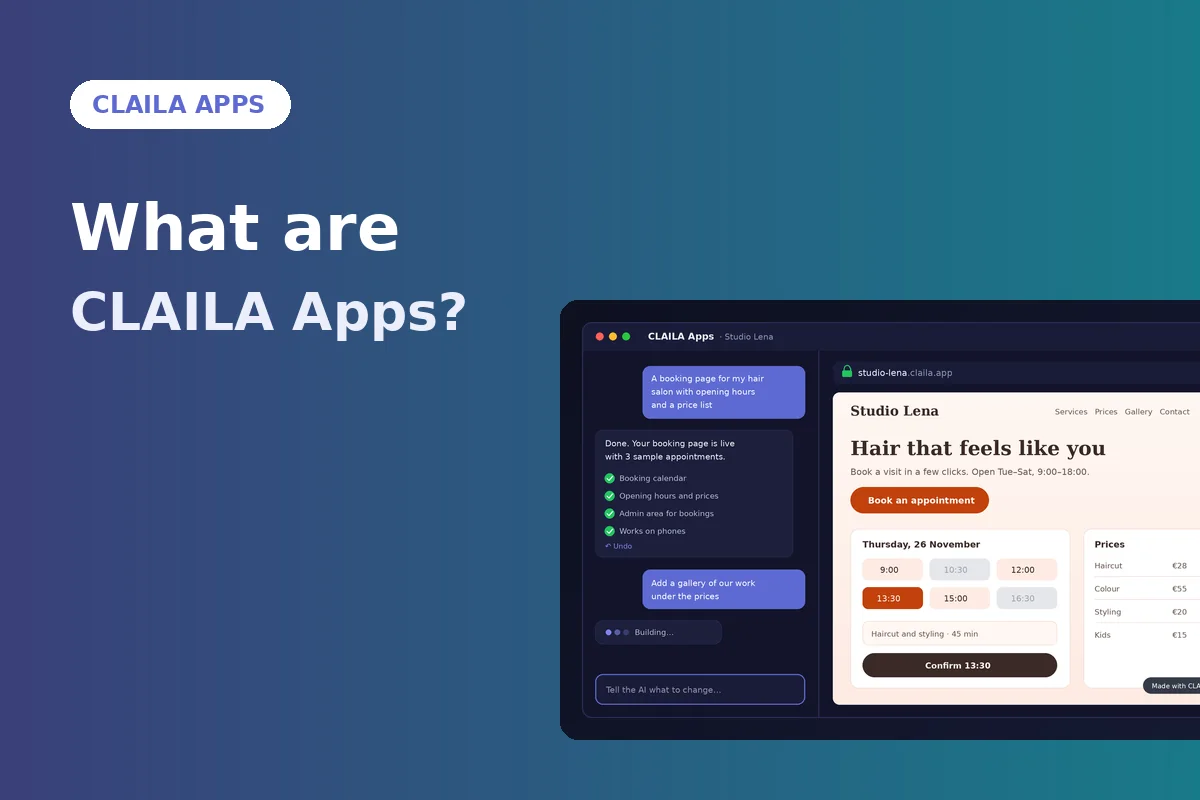

Most people who have an idea for a website or a small app hit the same wall. You either learn to program, pay someone who can, or squeeze your idea into a template that almost fits. CLAILA Apps take a different route: you describe what you want in plain words, and an AI developer builds it on a server that belongs to your app.
The short version is this: say what you want. AI builds it and it runs at your own address right away. This guide explains what that means in practice, what you can build, what it costs in terms of plans and credits, and where the limits are.
What CLAILA Apps are
CLAILA Apps (on the site you'll find them as AI Apps) is a part of CLAILA where every app gets three things:
- Its own small server. Your app doesn't share a server with other customers' apps.
- An AI developer. You talk to it in a chat. It writes the code, sets up what the app needs and shows you the result.
- Its own web address. As soon as you create the app, it is live at
https://<name>.claila.app, with HTTPS, within seconds.
You don't need to know how to program, and you don't need to know what a server, a database or a certificate is. You need to know what you want the app to do.
How it works, step by step
1. Name your app
Open CLAILA Apps and type a name, for example "Martin's bakery". The name becomes part of the address, and within seconds the server is ready.
2. Say what you want
Write, or dictate, what the app should be. You can add your logo or photos. A good first message describes who the app is for and what a visitor should be able to do:
A one-page website for a small bakery. Opening hours, a weekly menu with prices, a photo gallery and a map link. Warm colours, large text, looks good on phones.
The AI builds it and shows you the result in a preview. The app is already running at its address, so you can open it on your own phone right away.
3. Change anything
Ask for changes in plain words: "Make the header smaller", "Add a contact form", "Move the menu above the gallery". If you don't like a change, press Undo. Every AI step can be undone, so you can experiment without fear of breaking what already works.
4. Check it on a phone
Most visitors will see your app on a phone. The phone preview shows the app in portrait and landscape, so you can spot a button that is too small or a table that doesn't fit before your visitors do.
What you can build
CLAILA Apps work best for things that run in a web browser. Typical projects:
- Websites for a business, a club, an event or a portfolio.
- Booking systems, for example for a hairdresser, a tutor or a small rental.
- Browser games, from a simple quiz to an arcade game with a high-score table.
- Online shops with a product catalogue and an order form.
- Internal tools: records, simple CRMs, invoice lists, checklists for a team.
When the AI creates a database, it adds a few demo records, so you immediately see how the app looks when it's in use. When it creates an admin area, the admin page gets a random address and a random login name, so nobody can guess it. You find the logins under Logins and passwords; they stay on your server.
Three AI modes
Not every change needs the same amount of thinking. That's why you choose the AI mode for each message:
| Mode | Best for |
|---|---|
| Basic | Fast and the cheapest. Ordinary websites, texts, pictures and small changes. |
| Advanced | Apps with logins, a database or payments, and bigger changes. |
| Super advanced | The strongest. Complex apps and problems the other modes cannot solve. |
AI work is paid with credits. A stronger mode uses more credits, so a sensible habit is to use Basic for small edits and switch up only when the task needs it.
Free account and paid plans
You can try CLAILA Apps with a free account: it includes 3 messages in Basic mode. That is enough to create an app, see it live at its address and make a change or two.
Free apps have two limits worth knowing about:
- They show a small "Made with CLAILA" badge.
- They fall asleep after an hour without visitors or messages. Every real visitor wakes the app within seconds and keeps it awake for another hour.
Paid plans include always-on servers: Pro 1, Ultra 3 and Max 10. They also let you connect your own domain: Pro 1 per app, Ultra 3 and Max 5. You keep the domain where you bought it, add the DNS records CLAILA shows you, and the HTTPS certificate is usually ready in about 30 seconds after the domain points to your app.
Security and privacy
Because the AI writes and runs code for you, it's fair to ask what it can reach. The answer:
- Every app runs on its own server. The AI developer works only on your app's server and has no access to other customers' apps.
- Admin areas are hidden behind a random address and a random login name.
- You can make an app private. Enter up to 10 IP addresses, and only those addresses can open the app. Anyone else sees a "private app" page. This is handy for internal tools or for a project that isn't ready yet.
Tips for good results
- Start small. Ask for the core first (a page, a form, a list), then add features one message at a time.
- Be specific. "Add a booking form with name, phone, date and time, and show bookings in the admin" works better than "add bookings".
- Check the result after each step, on the phone preview too.
- Use Undo freely. It's often faster to undo and rephrase than to ask for a fix of a fix.
- Tell us what works and what doesn't. Under each reply you'll find thumb up, thumb down and a Feedback button.
Is it for you?
CLAILA Apps are a good fit if you have a clear idea, want to see it running today, and prefer describing to coding. They are also useful for developers who want a quick prototype on a real address without setting up hosting.
They are not magic. The AI can misunderstand you, and a complex app still needs testing: try the forms, try the logins, ask a friend to click through it. The difference is that you test and steer while the AI does the building, and every step can be taken back.